Posts

Making a Benfei USB switch smart with a ESP32 S3

Image
Summary  I am documenting my (successful) attempt to make a Benfei USB switch smart by adding an embedded ESP32 S3 zero board. This is because I found zero information about this device on the web, and it might help someone in the future. Background I wanted to be able to use Home Assistant to switch my keyboard and mouse between 2 pc's.  But I wanted to be able to control this via Home  Assistant so I could make it switch at the same time as I used it to switch my monitor input between the same 2 PCs, so I could have a smart KVM without spending the money on a proper one, and without losing my lovely 4k 144Hz capability. I did some googling and I saw that folk had successfully added a ESP32 to generic, cheap USB switches. So I took a punt on a Benfi one, ensuring that it had a remote control and optional external power, should they be needed for the project (they werent). The one I bought was https://amazon.co.uk/dp/B0DGFC4MWK It was less than £20 so even if I broke it, ...
Why I dont reccomend the best mouse in the world.

 Bought a Logitech MX master 3s mouse 2 and a half years ago. It was very expensive, but looked like a "mosue for life". It was everything I wanted in a mouse, as well as being a very good basic mouse, it had a great inertial scroll wheel, and the extra buttons worked brilliantly via their great windows app. But the best thing was, the multi device support works. For this first time in recorded history, I had a device that reliably roamed between 3 computers. I liked it so much that I invested in another "for life" splurge, the MX mechanical keyboard, which also has the perfect conectivity of the mouse. I also bought 2 more bolt receivers as I loved the eco system. Fast forward 2 and a half years, and the left button on the mouse stopped working. OK I thought, this is a young, premium mouse, logitech will sort me out. No. Their support bot eventually put me through to a human, and the first message I sent was " hi. i bought a mx master 3s in oct 2022 for 135 po...

SSD Upgrade on Lenovo Legion Go - Part 2 - Restore backup

Image
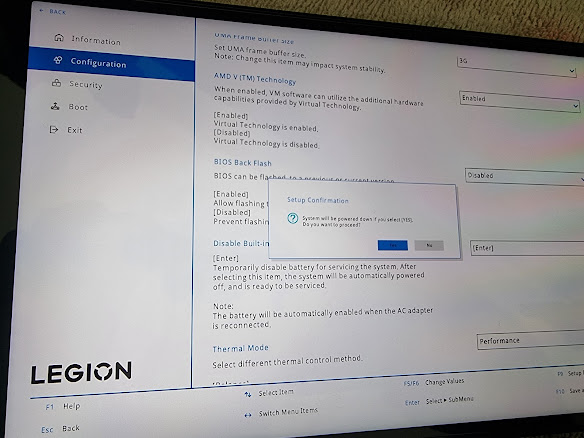
 TL;DR; - It worked perfectly as expected. 0. Prerequisites Same as part 1 2. Go into BIOS and disable internal battery (to disconnect the internal battery until external power is applied). Also disable secure boot. 2. Replace the SSD in the device. I bought one of these: https://www.amazon.co.uk/dp/B0C5YS3QY4?psc=1&ref=ppx_yo2ov_dt_b_product_details and the adaptor to make it long enough for the Legion Go https://www.amazon.co.uk/dp/B0BLJNGGVD?psc=1&ref=ppx_yo2ov_dt_b_product_details The hardware swap is well documented elsewhere. The hardest part was removing the foil from the old drive. 3. Insert the USB stick prepared earlier with Veeam and activate the boot menu (vol+ while power on, select boot menu. Also attach the large external drive with the backup image from before. 4. Boot from the USB stick prepared with Veeam 5. Wait for quite a while while it boots... 6. Pick bare metal recovery 7. Backup location - local storage... next... 7. Restore mode - entire computer (...

SSD Upgrade on Lenovo Legion Go - Part 1 - Backup the original drive using Veeam

Image
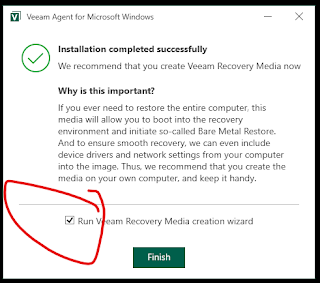
0. Prerequisites a) An adapter to allow you to plug USB devices into the Legion Go. I used this from Amazon: https://www.amazon.co.uk/dp/B09H44S96B?psc=1&ref=ppx_yo2ov_dt_b_product_details You might want to do some research on this - its doubled in price since I bought it last week, and its very slow (25Mb/s to the external SSD which can do 500Mb/s, but it might be the cage) If you buy this adaptor, make sure you plug the drive into the 1 out of the 4 USB ports that supports USB 3 :) b) An external drive big enough to hold the Legion Go SSD (in my case, 512Gb). I use a Samsung SATA SSD in a USB3 cage, since that is what I have. c) A Windows 11 iso. This can be downloaded from Microsoft (this is used to create the recovery media) The windows ISO is only needed if the computer doesn't have a recovery partition, which the Legion Go DOES, so this is not needed here. 1. Plug in a blank USB stick for the recovery media 2. Download Standalone Veeam Agent for Microsoft Windows here: ht...

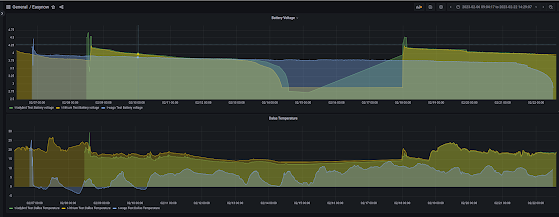
Wago is down - 500mah lasts 13.5 days reading the temp every 240s.

Image
  The blue line is the AZDelivery device, measuring the temperature every 240s on a 500maH ecig battery. It lasted 13.5 days. Its now going into production with a brand new 3000maH battery pack.

Man down...

Image
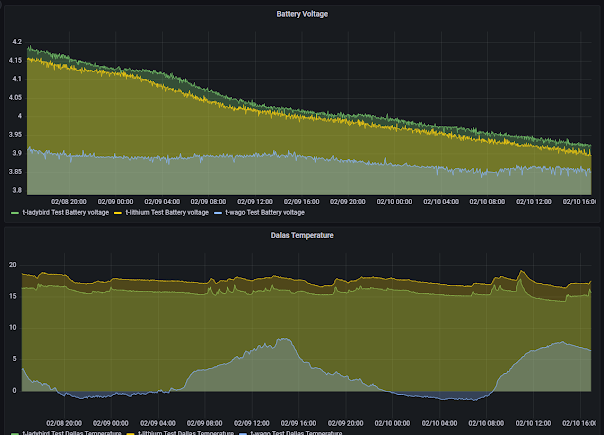
  Lithium is down after about 5 and a half days. This is the AZDelivery board with 70K potential divider, measuring every 60s. Ladybird (Firebeetle with 1M potential divider) isnt far behind. Wago (same as Lithium but measuring every 240s) is still on 3.78v after 8 or so days. These are all on a 500maH cell. conclusion so far: The Difference made by moving from a AZDelivery board and lower resister values doesn't make a huge deal of difference (half a day on about 5/6) The difference between measuring every 60s and every 240s is huge (not yet concluded) I will let this finish, then re-measure lithium and ladybird on a 240s schedule to see how they fare. edit: Ladybird is also down now, so the Firebeetle didn't really make a notable difference (nor did the higher resisters in the voltage measurement hack). We got an extra 5 hours on top of 5.5 days. It will be interesting to see if in a more sleepy (ie, every 240s) configuration the famed low power consumption of the Firebeetle ...

Race update

Image
Running the firebeetle (ladybird) and the AZDelivery boards, update every 60s (and also Wago which I didn't recharge before this). After 48h